
제품정보
- 종합 제품 카탈로그
- 종합 제품 카탈로그
- 산업별 제품분류
- 특장차량 · 중장비
- 토목 · 안전 · 유지관리계측
- 전자/유압 제어[EPEC] 컨트롤러
- 종류별 제품분류
- 각도 (기울기) 센서
- 가속도 센서
- 길이 측정 센서
- 자이로 센서
- 출력 변환 장치
- I/O 장치
- 무선 리모트 컨트롤러
- 통신 컨버터
- HMI·디스플레이
- 인디케이터
- 데이터로거·멀티플렉서
- 전원 장치
- 종합 제품 카탈로그
- 특장차량 · 중장비
- 토목 · 안전 · 유지관리계측
- 전자/유압 제어[EPEC] 컨트롤러
- HMI · 디스플레이 장치
- 각도 (기울기) 센서
- 가속도 센서
- 길이 측정 센서
- 자이로 센서
- 출력 변환 장치
- I/O 장치
- 무선 리모트 컨트롤러
- 통신 컨버터
- HMI·디스플레이
- 인디케이터
- 데이터로거·멀티플렉서
- 전원 장치
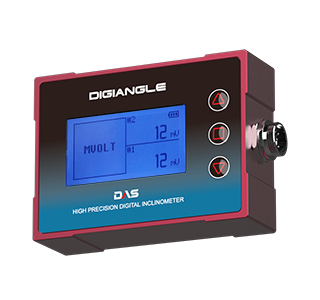

 |

Specifications
Measuring Sensor
Wiring Connections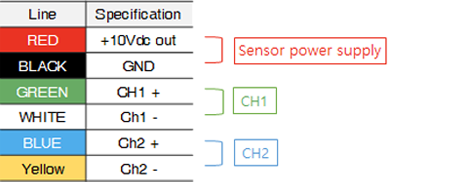
RechargingConnect the supplied USB charging cable to the USB port on theback to a PC or USB charging device for charging.
Accessories
|
|
||||||||||||||||||||||||||||||||||||||||||||||||||||
|
Instructions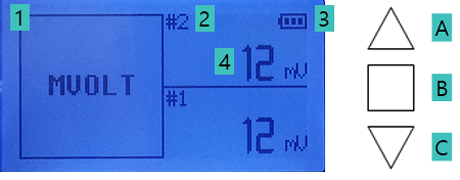
Ordering code
Notes
|
|
-
(주)다스
본사 : 전라북도 김제시 백산면 지평선산단3길 61
지사 : 경기도 화성시 비봉면 비봉로 128 (양노리)
전화 031) 356-3541 | 팩스 031) 356-3572
이메일 sales@das-co.com | 사업자등록번호 124-86-67387





Copyright ⓒ 2018 (주)다스. All rights Reserved